
How Do I Get More Restaurant Bookings?
The six things a diner checks before they book a table, and most restaurant websites answer none of them
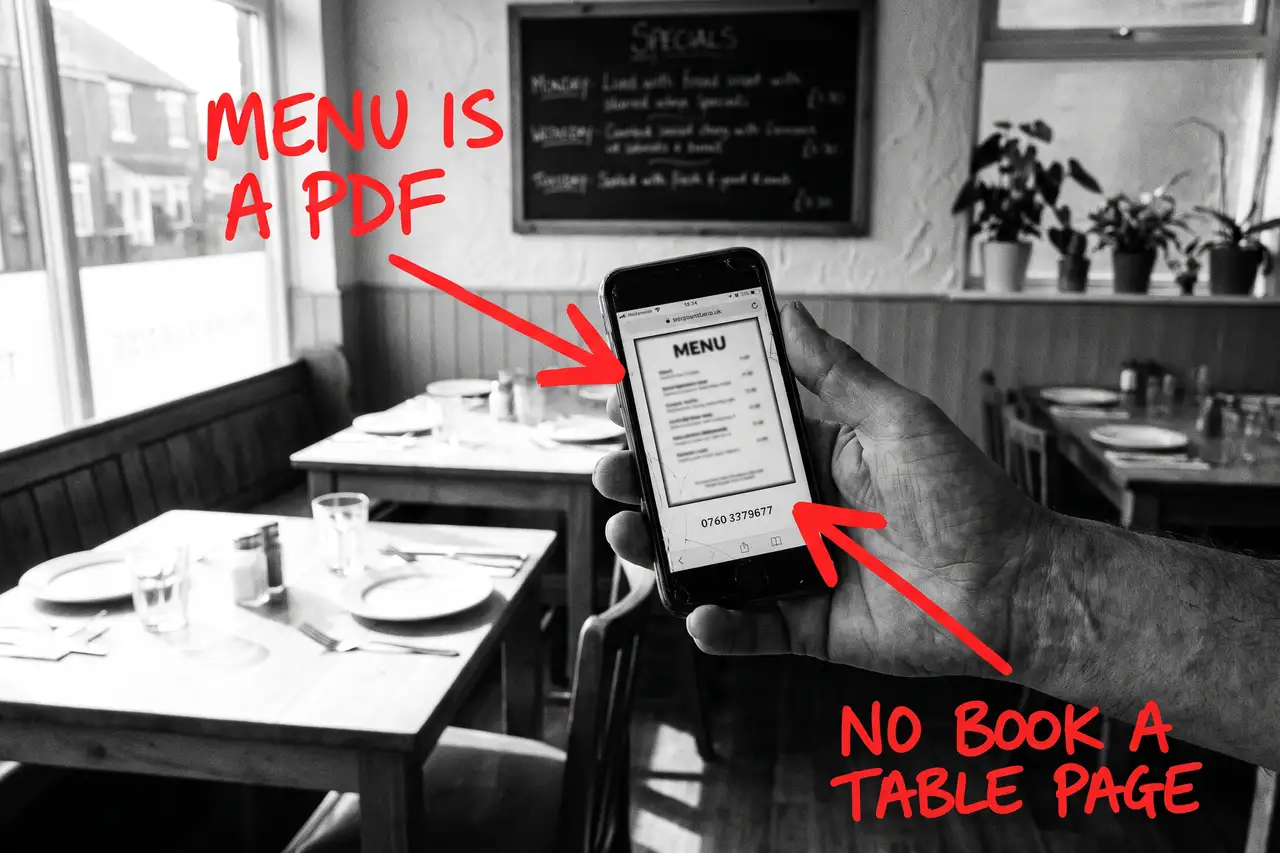
If you are searching how to get more restaurant bookings, you have probably already done the obvious. The food is good, the reviews are decent, you are on the booking apps and a delivery platform, Instagram gets a post most days, and the website was done a few years ago with a gallery, a PDF menu and a phone number. Yet Tuesday to Thursday is quiet, the bookings that do come arrive through an app that takes a cut, and the places that fill up on a wet Wednesday seem to be the ones Google shows first.
That is rarely one big problem. It is a short list of things a diner checks before they book, usually on a phone with three tabs open and someone asking where we are going, and most restaurant websites answer none of them because they were built to look nice rather than to answer questions.
Quick Version
A diner finds a restaurant three ways: a search for a cuisine or a dish with the town, a search for an occasion like a Sunday roast or a private room, and a map search for restaurants near me. Most restaurant websites win none of them, because the menu is a PDF, the booking button belongs to someone else and the occasions are one line on an events page.
The six things to check, in order:
- The menu is a PDF or a photo
- The booking button belongs to someone else
- The occasions are one line on the events page
- The practical questions are missing
- The Business Profile is doing all the work
- You are counting visits, not bookings by occasion
Most restaurants have four of these at once. None of them needs a new website, and none of them needs another app taking a cut.
Not Sure where to start?
All of this is a few evenings of somebody’s time if you know how diners search and how to write a menu page that ranks, and another year of paying commission if you do not. If you would rather someone typed the menu out properly, built the booking page, wrote the occasion pages and told you plainly which searches are now bringing bookings, that is what our SEO & AI service for restaurants does.
How Do I Get More Restaurant Bookings? The Full Guide
Work through these in order. The menu comes first because it is the biggest thing on most restaurant websites that Google cannot read, and the booking page comes second because it is where the commission goes.
The menu is a PDF or a photo
Someone types ‘tapas’ and the town, or ‘best steak near me’, or ‘vegan Sunday roast’ with the area. They are looking for a dish. On most restaurant websites the menu is a PDF behind a button, or a photo of the printed menu, and Google can read neither. So the search goes to the place that typed its menu out, even if the food is worse.
Put the menu on the page as text, with prices, dish names and the two-line descriptions you already print. Keep the PDF as a download if you like, but the text version is the one that ranks. Update it when the menu changes, which is a job for whoever writes the specials board, not a web developer.
A text menu is also what AI tools read when someone asks what a restaurant serves, and it is the single page on the site most likely to bring someone who has already decided what they want to eat.
The booking button belongs to someone else
Most restaurant websites have a Book Now button that opens an app, and nothing else. The app gets the booking, the commission and the customer’s email address. Your site gets a click.
Build a booking page of your own. How many you can seat, which nights need a deposit, how to book a large table, what happens if you are late, and the direct phone number. Keep the app widget on it if that is how you take bookings, but surround it with your own answers so the page ranks for ‘book a table’ with the town and the diner stays on your site.
If you take bookings by phone or by a form, say so plainly and say when someone will reply. A page that explains how booking works beats a button every time.
The occasions are one line on the events page
Sunday roast, private dining, Christmas parties, bottomless brunch, set lunch and the pre-theatre menu are each a separate search by a separate person with a separate budget. On most restaurant websites they are a sentence on the events page or a line in the footer.
Write a page for each occasion you want more of. What is included, the price per head, how many it seats, the dates and times, how to book it and a couple of photos of it actually happening. Three good occasion pages fill more tables than a gallery of fifty photos.
These pages rank for the occasion plus the town, they give AI tools a straight answer when someone asks where to have a birthday meal nearby, and they bring the bookings worth having: the big table on a quiet night.
The practical questions are missing
Before anyone books, somebody asks: is there parking, can we bring the dog, do you do gluten-free, are kids welcome, can we eat before the show, do you take walk-ins. On most restaurant websites the answer is nowhere, or in a FAQ nobody finds, so the diner books the place that answered.
Write the answers out on the pages where the question arises. Parking and access on the contact page. Allergens and dietary options on the menu page. Kids, dogs and large groups on the booking page. Pre-theatre timing on its own occasion page if you are near a venue.
This is not padding. It is the information that decides the booking, and it is exactly what AI tools draw on when someone asks for a dog-friendly place with a Sunday roast near them.
The Business Profile is doing all the work
For restaurants near me, the map result is the whole search. The Business Profile decides whether you appear, and on most restaurant listings the hours are wrong on a bank holiday, the menu link points at a PDF, the photos are stock and the last review was never answered.
Fix the profile: the right categories, accurate hours including holidays, the menu link pointing at your text menu, the booking link pointing at your booking page, photos of the actual food and room, and a reply to every review, especially the bad ones.
Then make the website back it up. The profile and the site should say the same things about hours, address, cuisine and bookings. When they disagree, Google and the AI tools trust neither.
You are counting visits, not bookings by occasion
A restaurant website can double its visits and fill no more tables, usually because the visits are people checking the hours on a Saturday they were coming anyway, or looking for a job, or in another county reading a blog post about your chef.
Put a tracked phone number on the site, make the booking page ask which occasion it is for, and record where each booking came from. In Search Console, look at which searches you appear for and whether they are the dishes, occasions and nights you want to fill. If your biggest search is your own name, the site is not bringing anyone new.
Once you can see bookings by occasion and by night, you know which page to write next and whether the website is feeding the quiet nights or just confirming the busy ones. Judge it on that, not on the visit count.
Common Mistakes
If you are still searching how to get more restaurant bookings after a couple of months of changes, one of these is usually why.
- Leaving the menu as a PDF or a photo. It is the most searched thing you own and nobody can search it.
- Sending every booking through an app. The app ranks for your town, keeps the customer’s details and takes a cut. Your own booking page should be the first result, not the app’s.
- Writing for ‘restaurant’ instead of the dish and the occasion. The generic word belongs to the apps and the directories. ‘Sunday roast’ plus your town belongs to whoever explains it best.
- Letting Instagram do the talking. Photos sell the room, but Google and the AI tools cannot read a photo. The words have to be on the website.
- Judging it after a month. The Business Profile can move in weeks. Menu, occasion and booking pages take a quarter or two to rank, and restaurant demand is seasonal. Fix the list, then judge it over a year.
DIY lane vs done for you lane
DIY lane:
Type the menu out as text with prices and keep it current. Build a booking page that explains how booking works and keep any app widget inside it. Write a page for each of the three occasions you want more of, with price per head, capacity and how to book. Answer the practical questions on the pages where they arise. Fix the Business Profile to match the site, with real photos and a reply to every review.
Then put a tracked number on the site, ask which occasion on the booking page, and leave it alone for a quarter while you watch bookings by occasion and by night.
Done for you lane:
This is the first two months of our SEO & AI service for restaurants. The menu rebuilt as a page Google and AI tools can read, a booking page of your own, the occasion pages written for the nights you want to fill, the practical answers put in words, the Business Profile sorted to match, restaurant structured data added with the cuisine, menu, hours and bookings, and booking tracking by occasion set up.
You get told which dishes, occasions and nights are now bringing bookings, which are not yet, and why. Then we keep going.
Related Guides on the wall
If you are working out how to get more restaurant bookings from your own website, these three cover the individual fixes in more depth.
- Why Is My Business Not Showing On Google Maps? for getting into the map result for restaurants near me with the right categories and hours.
- Google Business Profile optimisation for the menu link, the booking link, the photos and the review replies that decide the listing.
- How To Get More Google Reviews Without Bribing Anyone for the reviews that mention the dish and the occasion, which is what diners and AI tools read.
How Do I Get More Restaurant Bookings FAQs

Put the menu on the page as text, build a booking page of your own, write a page for each occasion you want more of, answer the practical questions and fix the Business Profile to match. Diners are already searching the dish, the occasion and the town. The restaurant that answers those searches best gets the booking, and it is not shared with an app.
Yes, with prices and descriptions, and keep it current. Google and AI tools cannot read a PDF or a photo, so a text menu is the page most likely to bring someone who has already decided what they want to eat. Keep the PDF as a download if you like, but the text version does the work.
For the searches that matter, yes. The apps rank for the generic words. A restaurant with a readable menu, a booking page and an occasion page wins the dish plus the town, the occasion plus the town and the map result, which is where the diners who have decided what they want are searching.
Only for the ones you want more of. Sunday roast, private dining and Christmas are the usual three. Each page says what is included, the price per head, how many it seats and how to book, and each one ranks for that occasion plus your town on its own.
The Business Profile can move within weeks once it is fixed. Menu, booking and occasion pages usually take a quarter or two to rank, and restaurant demand is seasonal, so judge it over a year on bookings by occasion and by night rather than on visits.
Getting more restaurant bookings from your own website is nearly always a matter of writing for the dish, the occasion and the town rather than for the word restaurant. Start with the menu and the booking page, write the occasions out, and the rest follows from there.
Like this guide?
Tell Google you want more like it. One click, no sign-up, and FlyPost guides start showing up more often in your search results.
Add FlyPost as a preferred sourceTakes you to Google, then straight back here.